
Why Is It Important to Remove Duplicates in Excel?
Why should you know how to remove duplicates in Excel? When working with large datasets or merging data from different sources in Excel, duplicate entries can often appear and cause issues. Removing duplicates is crucial for maintaining data accuracy, improving efficiency, and ensuring better decision-making. Duplicate entries can distort analysis, leading to incorrect conclusions, increase workload by creating unnecessary tasks, and reduce performance by overloading the database. Implementing good practices to prevent and eliminate duplicates enhances data readability and improves analysis accuracy, ultimately supporting more informed decision-making. We’ve described below two methods to remove duplicates in Excel:
How to remove duplicates in Excel
Method 1: Using the “Remove Duplicates” Tool
This method permanently removes duplicate rows.
Steps to Remove Duplicates:
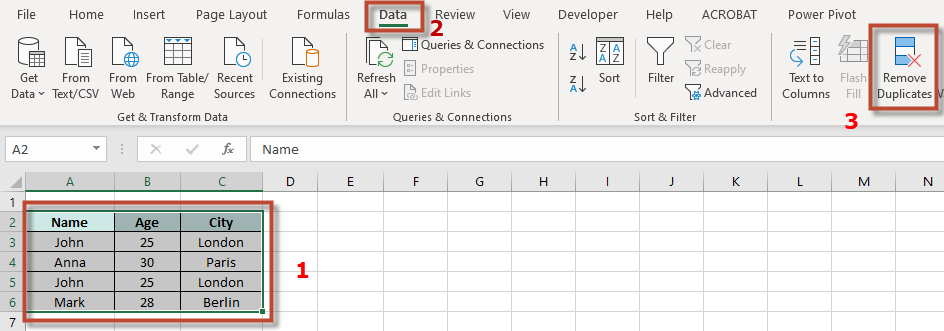
- Select Your Data
- Click anywhere in your dataset or highlight the range of data you want to clean.
- Open the “Remove Duplicates” Tool
- Go to the Data tab.
- Click Remove Duplicates in the “Data Tools” group.
- Choose Columns to Check for Duplicates
- In the dialog box, select the columns that should be checked for duplicates.
- If your data has headers, make sure the “My data has headers” box is checked.
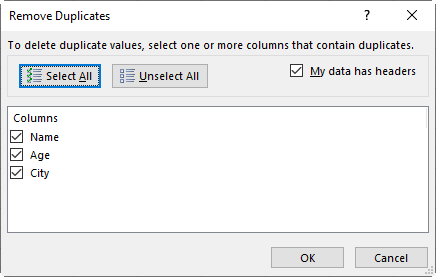
- Click OK
- Excel will remove duplicate rows and display a message indicating how many duplicates were removed.
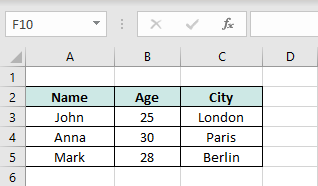
🚨 Note: Duplicates are evaluated from the combination of the selected columns. Make sure to select all the required columns to avoid unexpected results.
Method 2: Using Advanced Filters (Non-Destructive)
This method filters unique values without deleting anything.
Steps:
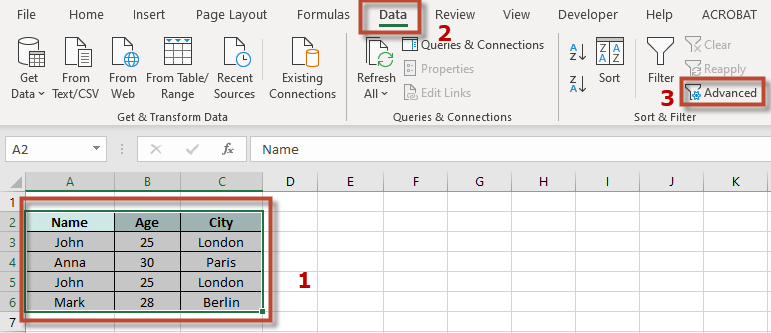
- Select your data range.
- Go to Data → Advanced (under “Sort & Filter”).
- In the “Advanced Filter” window:
- Choose “Copy to another location” (to keep original data intact).
- Select “Unique records only”.
- Choose a location to copy the filtered data.
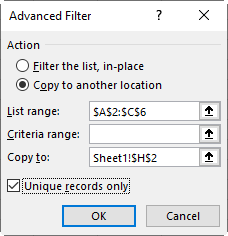
- Click OK—only unique records will be copied.

See also our products and tools
Gumroad Shop: